 Intro Intro
Forums
Last 30 Days
Tree View

Search Help
Chronological
Keywords

Requirements
Copyright
Register/Profile
Prepare Upload

Real Workshops
Contact
Credits
| |
 |
|
|
Viewing
All contributions are available for your viewing without prior registration. As the abstracts, posters and other attachments provided by the authors of contributions will normally be in Portable Document Format, they can be viewed with the Adobe Acrobat Reader�, available as freeware. This format preserves most features of the layout of source documents regardless of the application and platform used to create them. |
|
|
|
Posting
To post messages you are required to register one time only via the menu item "Register/Profile", "Instant Registration". After you have filled in the required items and your registration has been reviewed by the moderators, you will receive your password by E-mail at the address given. It can take a few days for your registration to be processed, and up to four weeks for a contribution to be reviewed by the moderators. If you suspect your E-mail has not been received, please contact the conference webmaster directly. As soon as you receive E-mail notification of your registration, we recommend that you return to the menu item "Register/Profile". Here, with your username and password you can make a number of useful adjustments. |
|
|
|
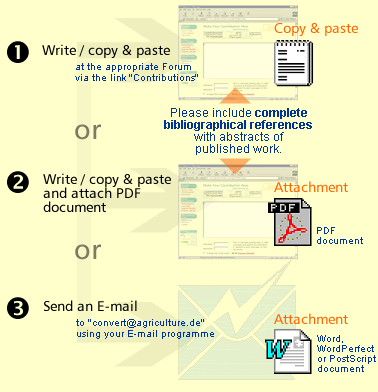
There are three ways to submit a contribution: |
|
|
|
|
|
Type or insert text (Copy&Paste):
For short contributions and your keywords. The easiest way to participate in this conference. Post directly from the "Make Your Contribution Here" window:
- You can type text in the window directly.
- You can insert text from any word processor via Copy & Paste.
- Readers can search the text via the "Keywords" option under "Personal Search".
But:
- No photos, graphics or tables.
Technical details and tools: Prepare Upload
For contributions with photos, graphics and tables, you should attach a PDF (Portable Document Format) file:
The original layout of your document is preserved: photos, graphics and tables
Readers can easily print out your document.
But:
Your document must be converted by a special PDF-conversion programme.
Technical details and tools: Prepare Upload
E-Mail Word, WordPerfect or PostScript files:
For longer texts with graphics, tables, formulas etc. Conference support will convert these contributions to PDF-format for viewing without those word processors.
Widely-used formats.
Most of the original layout is preserved.
But (for Word and WordPerfect):
Graphics, photos and tables must be embedded in the text, not just linked to it.
For PostScript files:
If you want to send a PostScript file please read the PostScript FAQ.
Technical details and tools: Prepare Upload
|
|
|
|